How do I add a contact to my account?

A contact/sub-account grants another email account controlled access to your account. 

 
Follow the instructions below to created a contact/sub-account.
  1. Login to your client area with your login credentials.
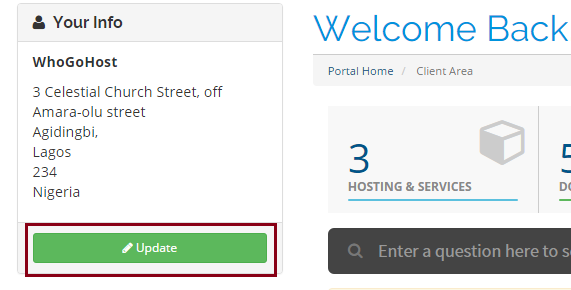
  2. Click on the Update button on the left hand side of the dashboard
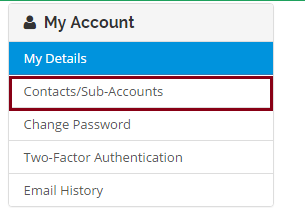
  3. Click on the Contacts/Sub-Accounts link on the left part of the page
  4. Enter the necessary details and choose all the permissions to grant the user. Select the check button if you want to make the new account a sub-account  
  5. Click the Save Changes button
  • payment
  • 0 Users Found This Useful
Was this answer helpful?

Related Articles

What is the difference between domains vs hosting vs website?

There are three basic parts that make up any current day web site:   The domain name The...

Network / Server Uptime Agreement

We at ARN HOST Hosting solution strive to offer the best in the industry for Network and Server...

I didn't get my welcome email or have since lost it how can I have it resent?

If you are unable to trace your welcome email in your inbox, please send an email to...

How long will it take to get my new site online?

We can have your site online the same day you submit your order. Your account will be setup...

How can I upgrade my service?

Please click the link below to learn how to upgrade your service Learn how to upgrade shared...

Powered by WHMCompleteSolution